
Parental Control App- FamiSafe
Shenzhen Wondershare Software Co., Ltd.Parenting
4.31.18K Reviews
- Version
- 9.1.7.1023
- Installs
- 5.00M
- Age Rating
- Everyone
Screenshots
Our Review of Parental Control App- FamiSafe
 Analysis by Appyee
When a child gets a first phone, I find that the hardest part is not installing a parental-control tool; it is deciding what boundaries are useful without turning every evening into a negotiation. FamiSafe is aimed at that practical middle ground: it brings location tools, app and web controls, and screen-time management together so a parent can set expectations and check in when needed. It is a Parenting app from Shenzhen Wondershare Software Co., Ltd., and its emphasis on social-media detection also makes it relevant to families thinking about online safety, not just time spent on a screen.
Start with a shared routine, not a pile of restrictions
My strongest advice is to treat setup as a family conversation. Before changing limits, agree on a few specific situations: when a device should be put away, which apps need attention during homework, and what kind of location check is genuinely helpful. That gives each control a clear purpose. Without that discussion, an alert or blocked app can feel arbitrary, and a child may focus on getting around the rule rather than understanding it.
A useful first-week routine is to check the dashboard at a predictable time, review what needs adjusting, and then leave the settings alone for a while. I would avoid making a new rule every time a notification catches your eye. A steady approach makes it easier to distinguish a genuine pattern from a one-off late-night session or an app used for a school task.
Settings that deserve a second look
Location tracking and geofencing can be reassuring, but they work best when the boundaries match real life. A school, a relative’s home, or a regular activity venue may be more meaningful than drawing a large number of zones that produce alerts no one acts on. Think in advance about what you will do if an arrival or departure alert comes through. If the answer is simply “notice it,” the alert may not need to interrupt your day.
App limits also need context. A child might spend time in a messaging app for a group project, while a game may be the distraction you actually want to manage. Checking app usage before applying a block helps you make a more targeted choice. I would explain the limit and its timing, then revisit it together after a few days instead of treating the first setting as permanent.
Web filtering is another area where expectations matter. Filters can reduce exposure to unsuitable sites, but they are not a substitute for talking about suspicious links, misleading content, or what a child should do when something uncomfortable appears. I see the setting as a useful layer of protection, not a promise that every online risk disappears.
Getting Started with FamiSafe
First things first, setting up FamiSafe was a breeze. I downloaded it from the app store, and within minutes, I was on my way to becoming a digital guardian. The app is available on both Android and iOS, which is super convenient if you’re juggling multiple devices at home. Once installed, you create an account, and voila, you're ready to roll!
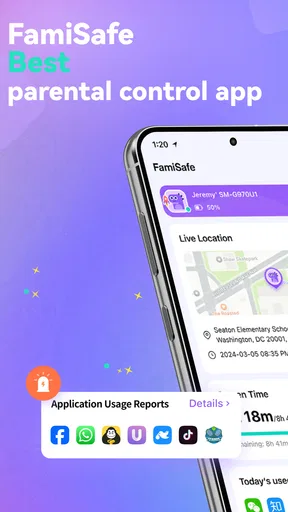
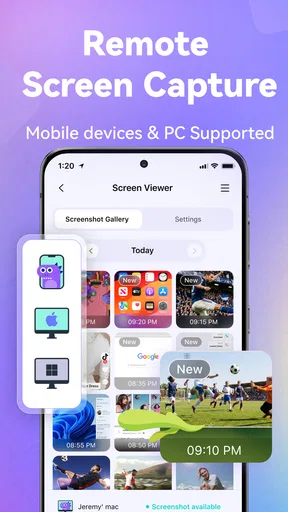
The user interface is pretty intuitive. Even if you’re not the most tech-savvy person in the world, you’ll find it easy to navigate. The app has a neat dashboard that gives you an overview of all the connected devices, which is a handy feature. You can monitor multiple devices from one place without any hassle.
Key Features to Explore
So, what does FamiSafe bring to the table? Quite a lot, actually! Here are some of the standout features that caught my attention:
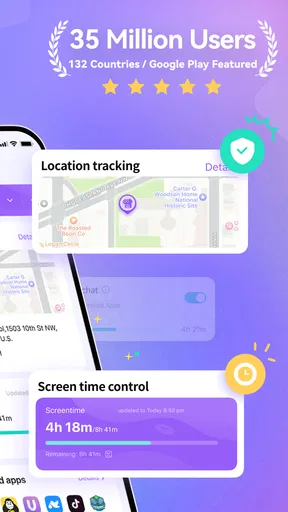
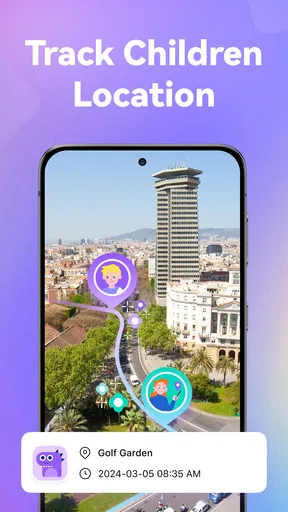
- Real-Time Location Tracking: This one’s a game-changer for peace of mind. You can see where your child is in real-time. Perfect for those "just checking in" moments.
- Geofencing: You can set up virtual boundaries and receive alerts when your child enters or leaves the specified area. This is like having an extra pair of eyes.
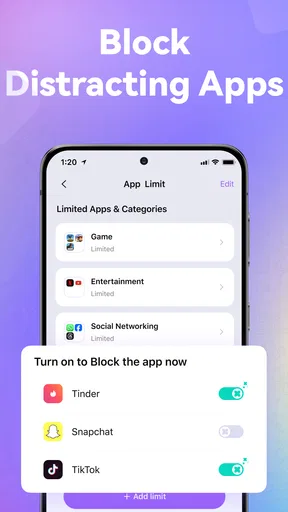
- App Blocker & Usage: Curious about which apps your kid is spending the most time on? This feature lets you monitor and even limit app usage, helping keep distractions at bay during study time.
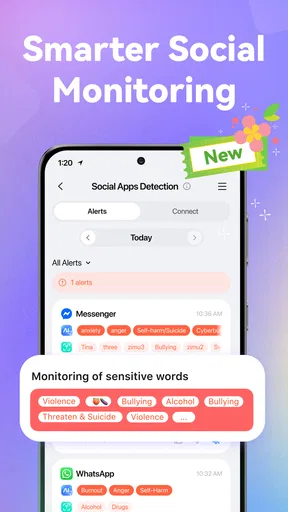
- Web Content Filtering: The internet is a vast place, and not always safe for kids. FamiSafe’s filtering tools let you block inappropriate websites and content. It’s like having a digital safety net.
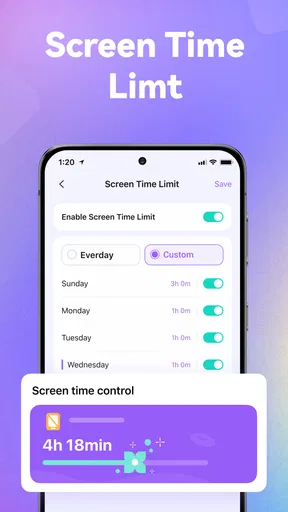
- Screen Time Management: Struggling with screen time battles? Set limits effortlessly and ensure your child isn’t glued to the screen all day long.
Make everyday checks useful
One realistic use case is a child who walks home from an after-school activity while a parent is still commuting. A location check can answer the immediate question of where they are, while a geofence alert can flag a change to the expected route or arrival pattern. I would use that information to decide whether a quick call is needed, not as a reason to watch the map continuously. The distinction matters: the tool is most helpful when it supports a sensible check-in rather than replacing trust.
For homework, a repeatable pattern can be more effective than a broad all-day restriction. Agree on a device break or study window, review which apps tend to pull attention away, and use app controls where they fit. Then make room for exceptions, such as a school task that uses a normally limited app. This approach makes the controls easier to explain and reduces the chance of blocking something useful by mistake.
Families with more than one child may also benefit from treating each device’s settings as a separate conversation. A younger child and a teenager are unlikely to need identical boundaries, even if they share a household. A single dashboard can make oversight more convenient, but convenience should not become a reason to copy the same rules across every device without considering age, routine, and responsibility.
Where it differs from simpler options
Compared with relying only on a phone’s built-in screen-time settings, FamiSafe brings location checks and geofencing into the same parental-control workflow as app use and web filtering. That broader view is useful if your main concern spans both online habits and a child’s journey between places. On the other hand, if you only need a basic bedtime limit or a short app break, the controls already available on a device may be enough and require less setup.
It also differs from a purely conversational approach. Talking with a child costs nothing and is essential, but it does not give a parent a quick location check or a way to apply an agreed app limit. I would combine the two rather than choose one: use FamiSafe for specific, transparent boundaries, and use conversations to explain why those boundaries exist. Families seeking covert surveillance or a way to avoid discussing expectations should look elsewhere; that is not a healthy basis for parental control.
My Personal Experience
After using FamiSafe for a couple of weeks, I must say I’m impressed. My favorite feature has to be the real-time location tracking. Knowing where my child is when they’re not at home gives me an incredible sense of security. The geofencing feature is equally brilliant; it sends me alerts if my kid steps out of a designated safe area. It’s like having a digital safety perimeter!
The screen time management tool has also been a blessing. I’ve noticed a significant decrease in my child’s screen time, which means more time spent outdoors and on other productive activities. Win-win!
Limits, trade-offs, and who should choose it
No parental-control app can make every decision for a family. A location alert gives information, not context; an app-use pattern does not tell you whether a child was chatting with friends or completing a task. If you respond to every signal immediately, the app can create more anxiety than reassurance. I would choose a small number of meaningful checks and make sure the child knows what is being monitored and why.
It may not be the right fit for a family that wants only a lightweight timer, or for an older teen who already manages device use responsibly and would experience monitoring as an unnecessary intrusion. It is more compelling when a parent needs several tools in one place and is willing to review settings thoughtfully. The app is free to download, but in-app purchases range from $5.99 to $109.99 per item, so I would check the available purchase options before relying on a paid capability or assuming every tool is included at no cost.
FamiSafe is rated for Everyone and supports Android 5.0 and newer. Its current version is 9.0.5.0202. It has a 4.3 average from around 15,000 ratings, with roughly 1,200 written reviews, and has passed 5 million installs. Those figures suggest it has reached many families, but they do not tell you whether its approach suits your child; the best test is whether its controls fit your household’s actual routines.
Is FamiSafe Worth It?
So, is FamiSafe worth your time and money? In my opinion, absolutely. It’s more than just a monitoring tool; it’s a comprehensive suite of features designed to keep your child safe in the digital world. While no app can replace active parenting, FamiSafe offers a solid foundation to build upon.
It’s not just about keeping tabs on your kids but also about teaching them responsible device use. The app encourages discussions about internet safety and healthy screen habits. Plus, with its easy-to-use interface and reliable features, it’s a tool I find myself recommending to other parents.
A considered verdict for families
What I would do before settling on it is agree on a short list of rules, choose only the alerts that lead to a useful action, and check whether the app’s purchase options match the features I plan to use. Then I would explain the arrangement to my child and revisit it as their independence grows. That small routine is less dramatic than constant monitoring, but it makes the controls more understandable and easier to keep fair.
FamiSafe makes the most sense for parents who want location awareness alongside practical screen and content controls, especially when managing a child’s device is part of a wider family routine. If all you need is one basic restriction, a built-in setting may be simpler; if you want support across several concerns, this app offers a more joined-up approach. I like it best as a tool for informed check-ins and agreed boundaries, not as a substitute for trust or conversation.
In conclusion, give FamiSafe a try if you’re looking for a trustworthy parental control app. It's a small investment for a big peace of mind. Happy parenting, and may your digital adventures be safe and sound!
Privacy and Permissions
See what permissions an app requests and how it handles your data.
- Calendar
- read calendar events plus confidential information, add or modify calendar events and send email to guests without owners' knowledge
- Location
- approximate location (network-based), precise location (GPS and network-based)
- Photos/Media/Files
- read the contents of your USB storage, modify or delete the contents of your USB storage
- Storage
- read the contents of your USB storage, modify or delete the contents of your USB storage
- Camera
- take pictures and videos
- Wi-Fi connection information
- view Wi-Fi connections
- Other
- view network connections, pair with Bluetooth devices, access Bluetooth settings, connect and disconnect from Wi-Fi, control flashlight, full network access, change your audio settings, run at startup, control vibration, prevent device from sleeping, set an alarm
Verdict
Strengths of Parental Control App- FamiSafe
- Comprehensive location tracking features.
- Screen time management tools included.
- App blocking for specific apps or categories.
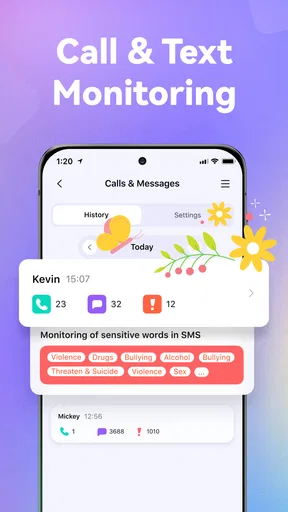
- Real-time alerts for suspicious activity.
- User-friendly interface for quick setup.
Limitations of Parental Control App- FamiSafe
- Premium features require a subscription.
- Limited functionality during trial period.
- Some features drain battery quickly.
- Occasional delays in real-time updates.
- Limited support for certain devices.
Similar Picks in This Category
View All
Family Space
Motorola Mobility LLC.3.9

شرطة الأطفال - مكالمة وهمية
Oub Apps4.1

Findmykids: Parental Control
LETEM LTD4.6

Pregnancy + | Tracker App
Philips Electronics UK Limited4.8

Policía de niños - para padres
Kids police4.7

Pregnancy App
Amila4.9
Frequently Asked Questions
What features does FamiSafe offer to help monitor my child's device?
FamiSafe provides a comprehensive set of features including real-time location tracking, app usage monitoring, and screen time management. Additionally, it offers content filtering for web browsing and social media, enabling parents to block inappropriate sites and apps. These tools help parents ensure their child's safety and manage their digital habits effectively.
How does FamiSafe ensure my child’s privacy and data security?
FamiSafe takes privacy and data security seriously by employing encryption protocols to safeguard all personal information. The app also complies with international privacy regulations, ensuring that your child's data is not shared with third parties. Parents can rest assured that all collected data is used solely for monitoring purposes and is kept confidential.
Is FamiSafe compatible with both Android and iOS devices?
Yes, FamiSafe is compatible with both Android and iOS devices. This cross-platform support allows parents to monitor their child's activities regardless of the device they use. The app provides seamless integration and functionality across different operating systems, making it versatile for families with multiple types of devices.
Can I manage multiple devices with a single FamiSafe account?
Absolutely, FamiSafe allows parents to manage multiple devices under a single account. This is particularly useful for families with more than one child, as it provides a centralized dashboard to monitor and control all connected devices, making it easier to implement consistent rules across the board.
What is the pricing structure for FamiSafe, and is there a free trial available?
FamiSafe offers a variety of subscription plans to suit different needs, including monthly, quarterly, and annual options. This flexibility allows users to choose a plan that best fits their budget. Moreover, FamiSafe provides a free trial period so parents can test the app's features and usability before committing to a subscription.
